
Why This Matters for D2C and Shopify Sellers
If you talk to any D2C founder, one problem comes up again and again: customers add items to cart, then they disappear.
Most Shopify sellers try to fix this using:
- Automated emails
- WhatsApp reminders
- Discount nudges
- Chat widgets
All of these approaches assume the customer is willing to read, scroll, and process information, usually in English.
But, in India, that assumption often breaks.
India is a voice-native market. People are comfortable asking questions verbally, especially when shopping:
- “Is this kurta cotton?”
- “What sizes are available?”
When answers are buried inside long descriptions written in English, customers don’t always abandon because they dislike the product. Often, they leave because finding the right information takes effort.
This project started from a simple observation:
If customers can speak their questions, why should stores only reply in text?
What I Set Out to Build
The goal was not to build a fancy chatbot.
The goal was to build a store-aware voice assistant that:
- Understands Shopify product and policy data
- Answers questions accurately using retrieval (not guessing)
- Speaks answers out loud
- Supports natural follow-up questions
At the end, the assistant behaves like a helpful store staff member, not an FAQ page.
High-Level Flow of the System
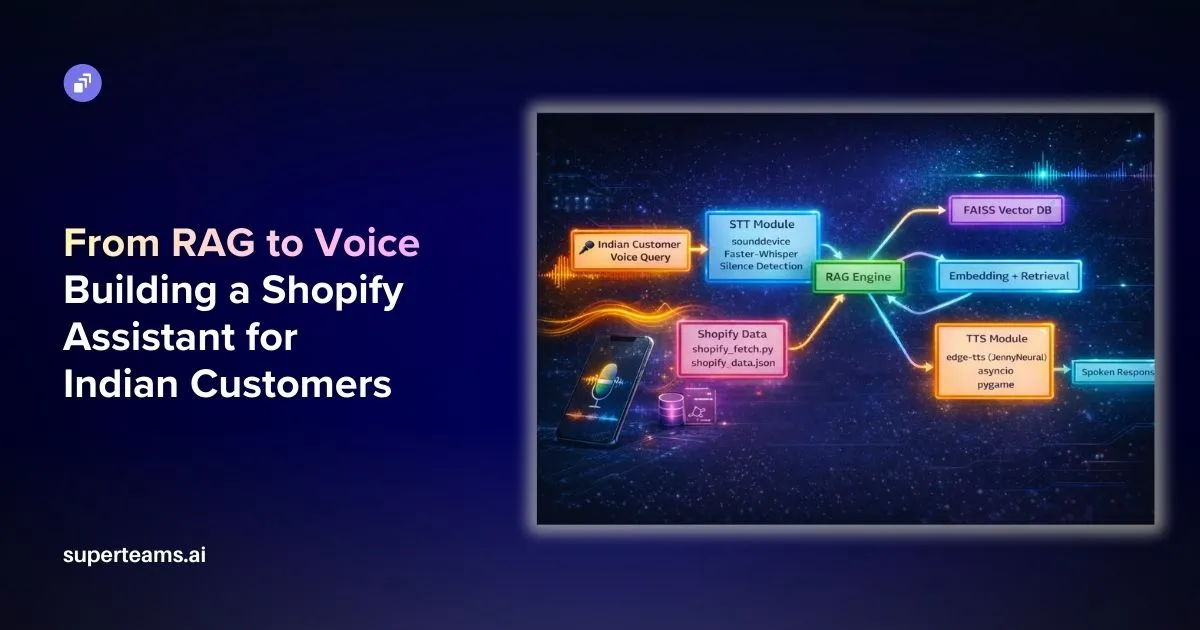
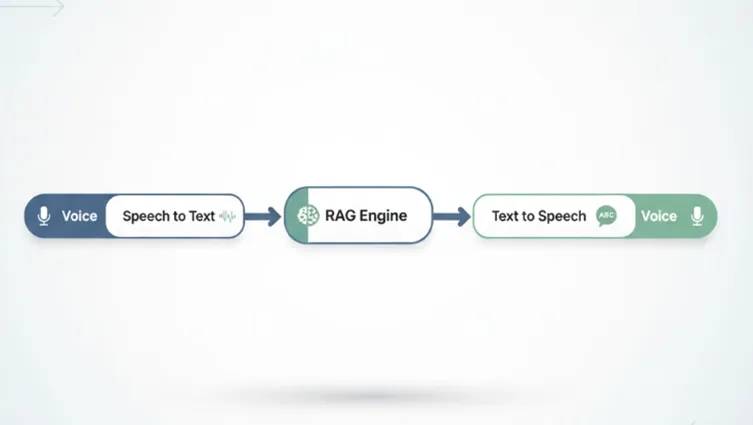
At a conceptual level, the system works like this:
- The customer speaks a question
- Speech is converted to text (STT)
- Question is answered using RAG over Shopify data
- Answer is converted back to speech (TTS)
- Assistant waits for the next question
This loop continues until the customer says “exit” or “stop”.
The Foundation: RAG Over Shopify Data
The engagement depends on the quality of the responses. And we need to remember that voice only amplifies wrong answers—it does not fix them.
Data the Assistant Knows
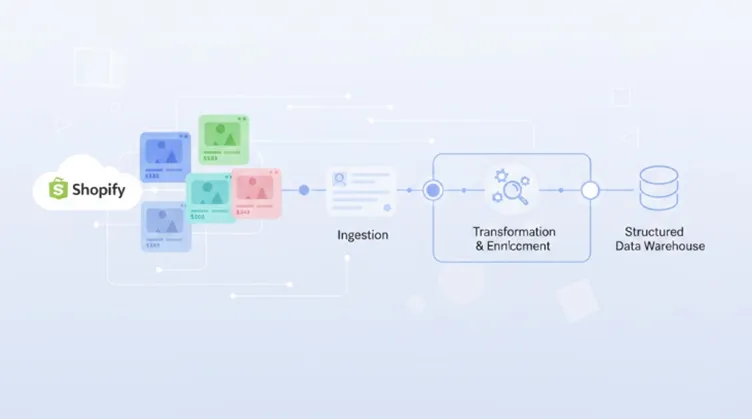
The assistant is built using real Shopify store information:
- Product names
- Prices
- Available sizes
- Fabric and material details
- Shipping timelines
- Return and refund policies
This data is fetched from Shopify, cleaned to remove HTML, and converted into plain text.
Chunking and Preparation
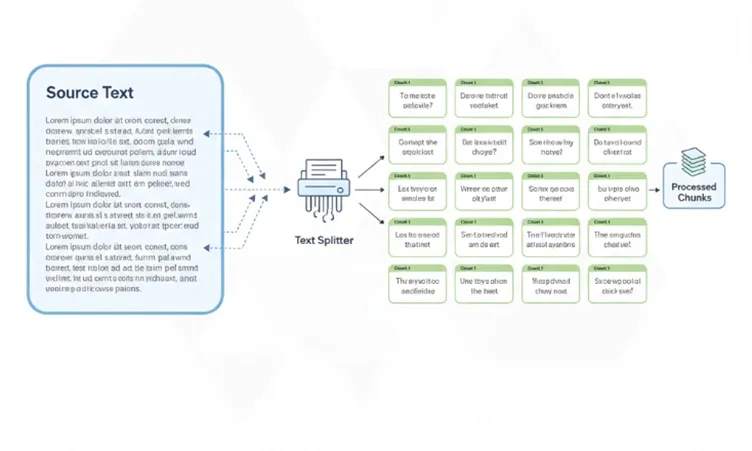
Raw product pages are long and messy. Reading them aloud would be useless.
So the content is:
- Broken into small, meaningful chunks
- Grouped logically (product-level, policy-level)
- Stored in JSON
Chunking ensures:
- Product questions don’t retrieve policy text
- Policy questions don’t retrieve product descriptions
- Answers stay relevant and short
def chunk_text(text, size=CHUNK_SIZE):
    chunks = []
    start = 0
    while start < len(text):
        chunks.append(text[start:start + size])
        start += size
    return chunks

with open(os.path.join(SCRIPT_DIR, "shopify_data.json"), "r", encoding="utf-8") as f:
    data = json.load(f)

chunks = []

for item in data:
    text_chunks = chunk_text(item["content"])
    for chunk in text_chunks:
        chunks.append({
            "title": item["title"],
            "type": item["type"],
            "content": chunk
        })

with open(os.path.join(SCRIPT_DIR, "rag_chunks.json"), "w", encoding="utf-8") as f:
    json.dump(chunks, f, indent=2)

print("Chunking complete. Total chunks:", len(chunks))
Chunking the data
Embeddings and Vector Search
Each chunk is converted into a vector embedding using a sentence-transformer model.
These embeddings are stored in a FAISS index, which allows semantic search.
When a customer asks:
“What sizes do you have in cotton kurta?”
The system retrieves:
- The cotton kurta chunk
- Not unrelated products
- Not shipping policies
This is the core of the RAG system.
Handling Real Customer Questions (Not Textbook English)
Real customers don’t speak like documentation.
They say things like:
- “cotton kurta size?”
- “fabric of kurta”
To handle this, the assistant uses:
- Keyword-based intent detection (price, size, fabric)
- Product name extraction from the spoken text
- Attribute-level answer extraction
Instead of reading the entire product description aloud, it extracts only what is relevant.
Example:
- Question: “What is the fabric of kurta?”
- Answer: “The cotton kurta is made from 100% pure cotton.”
This keeps voice responses short, focused, and natural.
Speech-to-Text (STT): How Voice Becomes Text
The Speech-to-Text module converts user voice input into text using Hugging Face transformer-based speech recognition models.
model = WhisperModel("base", compute_type="int8")
def listen(fs=16000, silence_threshold=0.015, silence_duration=1.5, max_duration=12):
    """
    Record audio dynamically until silence is detected after speech starts.
    - silence_threshold: RMS amplitude below which audio is considered silent
    - silence_duration:  seconds of silence needed to stop recording
    - max_duration:      hard cap on recording length in seconds
    """
    print("Listening...")

    chunk_size = int(fs * 0.1)          # process in 100ms chunks
    max_chunks = int(max_duration / 0.1)
    silence_chunks_needed = int(silence_duration / 0.1)
    audio_chunks = []
    silent_count = 0
    speech_started = False

    with sd.InputStream(samplerate=fs, channels=1, dtype='float32') as stream:
        for _ in range(max_chunks):
            chunk, _ = stream.read(chunk_size)
            audio_chunks.append(chunk.copy())

            rms = np.sqrt(np.mean(chunk ** 2))

            if rms > silence_threshold:
                speech_started = True
                silent_count = 0
            elif speech_started:
                silent_count += 1
                if silent_count >= silence_chunks_needed:
                    break

    if not audio_chunks or not speech_started:
        return ""

    recording = np.concatenate(audio_chunks, axis=0)
    # Convert float32 [-1, 1] → int16 for a standard WAV that Whisper handles reliably
    recording_int16 = (recording * 32767).astype(np.int16)
How It Works
- The user speaks into the microphone.
- The audio input is captured and processed.
- A pretrained Hugging Face ASR (Automatic Speech Recognition) model transcribes the speech into text.
- The transcribed text is forwarded to the RAG pipeline for query processing.
Technologies Used
- faster-whisper (WhisperModel – base, int8 optimized)
- sounddevice (microphone input streaming)
- numpy (audio signal processing & RMS calculation)
- tempfile (temporary audio storage)
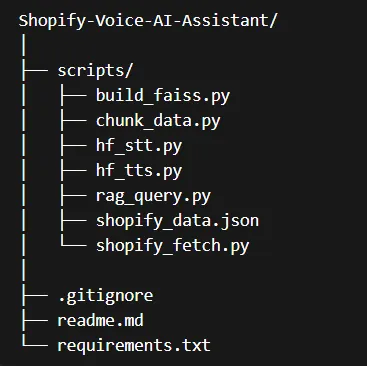
File
scripts/hf_stt.py
Purpose
This module enables natural voice interaction with the AI assistant, eliminating the need for manual typing.
Text-to-Speech (TTS): Turning Answers into Voice
The Text-to-Speech module converts the AI-generated text response back into natural-sounding speech.
pygame.mixer.pre_init(frequency=44100, size=-16, channels=2, buffer=512)
pygame.mixer.init()

# Sweet, natural neural voice — options you can swap:
#   "en-US-JennyNeural"  — warm and friendly (default)
#   "en-US-AriaNeural"   — calm and clear
#   "en-US-SaraNeural"   — bright and polite
VOICE = "en-US-JennyNeural"
async def _generate(text: str, path: str):
    communicate = edge_tts.Communicate(text, voice=VOICE, rate="-5%", pitch="+0Hz")
    await communicate.save(path)
How It Works
- The RAG module generates a text response.
- The text is passed to a Hugging Face TTS model.
- The model synthesizes human-like speech.
- The audio is played back to the user.
Technologies Used
- edge-tts (Neural voice synthesis – Microsoft Edge voices)
- asyncio (asynchronous speech generation)
- pygame (audio playback)
- os (file cleanup)
File
scripts/hf_tts.py
Purpose
This module provides a fully voice-enabled AI assistant experience by converting responses into speech.
SCRIPT_DIR = os.path.dirname(os.path.abspath(__file__))

# Load chunked data
with open(os.path.join(SCRIPT_DIR, "rag_chunks.json"), "r", encoding="utf-8") as f:
    data = json.load(f)

texts = [item["content"] for item in data]

# Load FAISS
index = faiss.read_index(os.path.join(SCRIPT_DIR, "faiss.index"))

# Load embedding model
model = SentenceTransformer("all-MiniLM-L6-v2")
welcome = "Shopify Voice Assistant started. Ask your question."
print(welcome)
speak(welcome)
Why Voice Matters Specifically in India
Voice changes how customers interact with a store:
- It reduces effort
- It feels conversational
- It works well even when grammar isn’t perfect
- It builds trust faster than long text
For Indian Shopify sellers, this can improve:
- Product clarity
- Customer confidence
- Overall shopping experience
Sometimes, a clear spoken answer is all a customer needs to move forward.

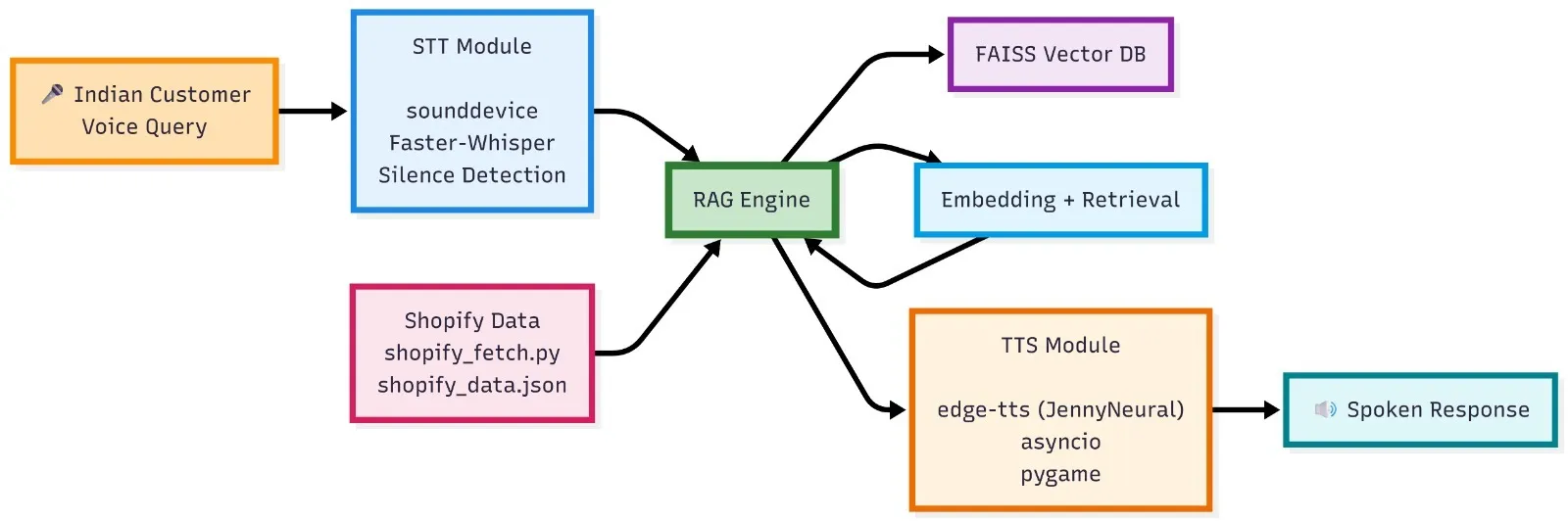
Architecture Summary
Data Layer
- Shopify products and policies
RAG Layer
- Chunking
- Embeddings
- FAISS vector search
Logic Layer
- Intent detection (price, size, fabric)
- Product name extraction
- Attribute-based answers
Voice Layer
- STT
- TTS
Each layer is independent, making the system:
- Easier to debug
- Easier to extend
- Practical for real use
Shopify voice assistant
Possible Extensions Beyond This Project
Although this project focuses on voice-based support, the same architecture can be extended to:
- Cart-drop voice follow-ups
- WhatsApp voice notes
- Multilingual STT/TTS engines
- Human handoff for complex cases
Once the store knowledge is solid, voice becomes just another interface.
At Superteams, we help you build voice agents customized to your business needs. To learn more, speak to us.
Project Link
You can explore the project here:
**🔗 Project Repository:
**https://github.com/AbhinayaPinreddy/Shopify-Voice-AI-Assistant
-Feature-Image.CjBFdO7y_Z1bTNvg.webp)