
Manufacturing is undergoing a seismic shift, AI-driven multiagent systems are at the heart of this transformation. By leveraging specialized, cooperating agents, modern manufacturing supply chains can achieve real-time decisioning, deep process insight, automated document enrichment, and on-demand upskilling of employees, all on a robust, cloud-hosted, and scalable stack.
This article provides a practical, technically deep guide to building such a multi-agent system using the latest open frameworks: PydanticAI for composable agent orchestration, ClickHouse for scalable tabular and vector data storage, and the Mistral Magistral Small LLM for advanced reasoning.
We’ll ground this in a supply chain scenario, demonstrating four collaborating agents:
- Employee Training Agent (continuous upskilling and compliance checks)
- Supply Chain Analysis Agent (detects bottlenecks and optimizes flow)
- Invoice Enrichment Agent (auto-validates and tags supplier invoices)
- Quality Assurance Agent (detects anomalies in production and triggers alerts)
By the end of this article, you will have a scaffold by which to create multi-agent systems, especially in the manufacturing sector, where supply chain automation can dramatically improve productivity.
Let’s dive in.
What is an AI Agent?
Before we begin, let’s take a quick look at what AI agents are.
An AI agent is a self-contained, goal-driven computational entity that perceives its environment, processes observations, and autonomously executes actions to achieve specific objectives.
Technically, an AI agent is characterized by its policy, a mapping from perceptual inputs (which may include structured data, sensor readings, unstructured documents, or API responses) to actions or outputs. This mapping can be stateless (simple rules) or stateful, incorporating memory (episodic, semantic, or vector-based) to maintain context over time.
Modern AI agents often combine symbolic reasoning (e.g., rules, logic), machine learning (pattern recognition, embeddings), and tool use (via APIs or plug-ins) to make complex, context-aware decisions.
What distinguishes advanced AI agents in contemporary systems is their ability to operate in dynamic, open-ended environments, integrating multiple AI capabilities, such as language understanding (LLMs), perception (CV, sensor fusion), and retrieval (vector search, knowledge graphs), under a unified control loop.
Technically, agents interact through explicit interfaces, exchanging typed messages or function calls, and can be orchestrated into multiagent systems for collaborative or competitive problem-solving.
Orchestration frameworks like PydanticAI formalize agent inputs/outputs using strongly typed models, enabling safe inter-agent communication and composability, while supporting external tool invocation, long-term memory, and hierarchical agent composition for complex, multi-stage tasks.
So, to summarize, AI agents encapsulate:
- Data Access: Agents interface with structured and unstructured data sources, SQL databases, APIs, IoT sensors, and document repositories, to ingest, contextualize, and act upon real-time information.
- Tool Use: Beyond basic computation, agents dynamically invoke external tools and APIs (e.g., for retrieval, enrichment, or actuation), enabling them to extend their capabilities far beyond their internal logic.
- Reasoning Engine: At their core, agents contain embedded or external reasoning modules, ranging from symbolic logic to deep learning models (such as LLMs or graph neural networks)m which process observations, synthesize insights, and generate actionable outputs.
- Guardrails: Robust agents incorporate guardrails—type-validated interfaces, policy constraints, and safety checks, to ensure reliable, secure, and domain-compliant behavior, especially in mission-critical applications like manufacturing.
- Memory and State: Effective agents maintain both short-term and long-term memory, enabling them to reference past interactions, learn from experience, and optimize future actions in dynamic environments.
- Communication Interface: Agents expose explicit, structured interfaces for safe and reliable communication with other agents or orchestrators, supporting both direct messaging and function call-based workflows.
By combining these components, AI agents become modular, composable units of intelligence that can be orchestrated into powerful multiagent systems, each agent specializing in distinct tasks, sharing context, and collaborating to solve complex, end-to-end business problems in manufacturing and beyond.
Let’s now look at how multiagent systems work.
Why Multiagent Systems?
If you are able to build capable agents, you can orchestrate them to create multiagent systems that complete entire tasks on their own. This can be invaluable in scenarios where you have a lot of legacy data and systems that have been a challenge to modernize.
In domains like manufacturing, where workflows are heterogeneous (from HR to logistics to QA), a multiagent setup allows:
- Task Specialization: Each agent encapsulates domain logic and memory.
- Parallel Processing: Independent agents can process data in parallel (critical for throughput).
- Orchestrated Reasoning: Orchestrators (via PydanticAI) route queries, persist shared context, and enable coordination.
- Incremental Modernization: New agents can be introduced without disrupting legacy flows.
With this workflow, you can scale the number of agents incrementally without disrupting existing processes.
Let’s take a simple example. Most manufacturing companies have manuals that workers are supposed to follow for each process step, whether it’s machine calibration, safety procedures, or quality checks. In reality, those manuals are often scattered across PDFs, paper binders, or outdated intranet systems.
By deploying a multiagent system, you can assign one agent to extract and structure the content from these manuals, another to cross-reference them with live sensor data, and a third to answer real-time worker queries (or help train workers) or flag compliance violations as they happen. All of this occurs autonomously, without you having to manually orchestrate the flow.
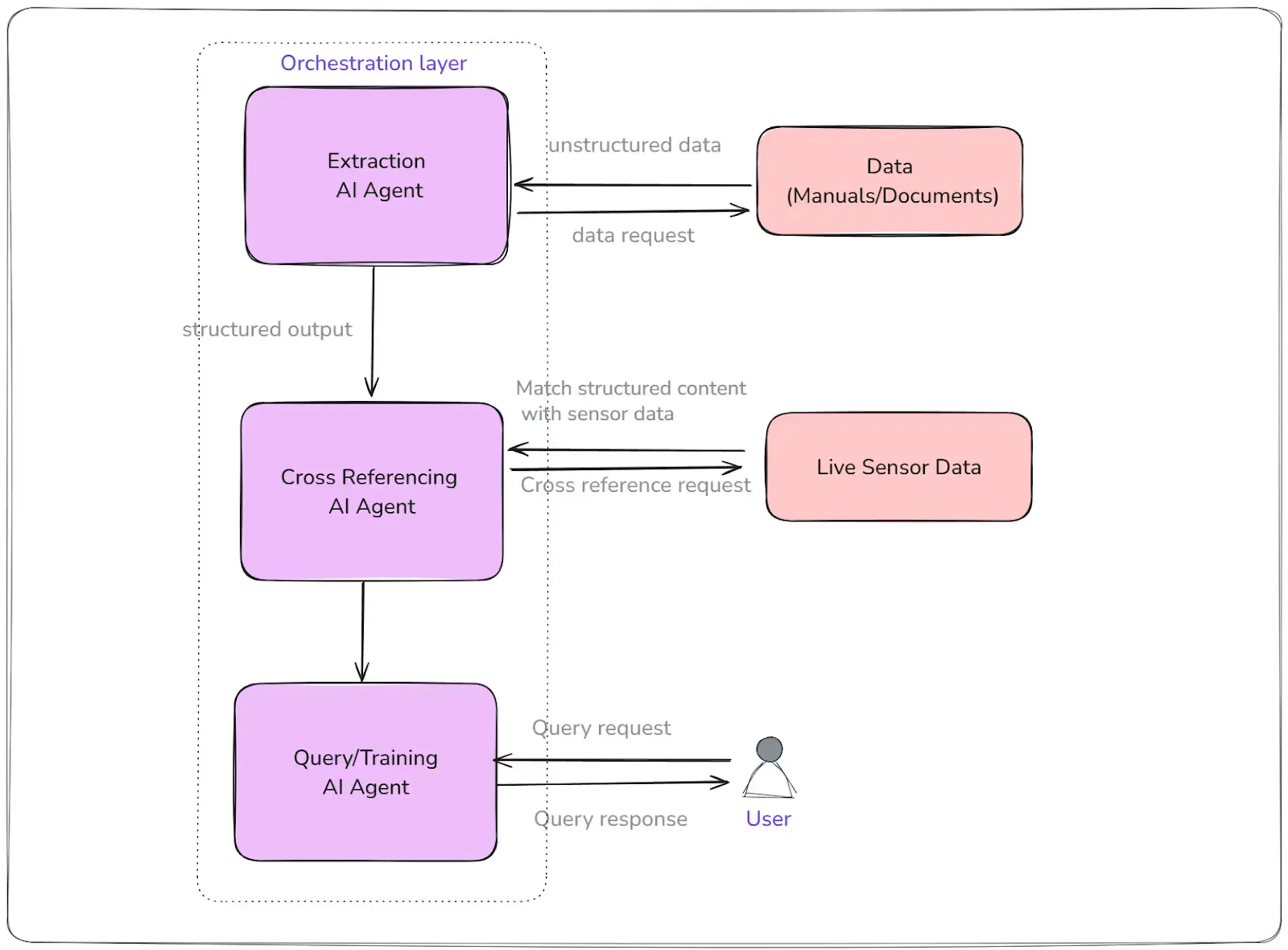
What’s powerful here is that you don’t have to overhaul your entire tech stack at once. You can start with one or two specialized agents, perhaps an invoice validation agent and a training agent, and as your needs evolve, incrementally add new agents for analytics, quality assurance, predictive maintenance, or supply chain optimization.
In short, multiagent systems let you break down complex, end-to-end workflows into composable, intelligent building blocks, making your entire manufacturing operation more adaptive, resilient, and future-ready.
Technology Stack for Building Multiagent Systems
There are several agent orchestration frameworks available today, including LangChain, Microsoft’s Autogen, OpenAI Agents SDK, and CrewAI. While these frameworks can greatly simplify agent orchestration, you may find that too much “framework magic” can make it difficult to debug and deeply understand your agentic workflows. If your goal is high accuracy and quality, it often pays to keep the orchestration layer as thin and transparent as possible. By doing so, you can focus your efforts on optimizing the underlying data architecture and refining your prompt strategies, ensuring that you extract the best possible performance and reliability from your multiagent system.
PydanticAI for Agent Orchestration
In this article, we’ll use PydanticAI as the orchestration layer. PydanticAI serves as a foundational building block for many agentic frameworks, providing type-safe, modular orchestration without unnecessary complexity.
- Structured inputs/outputs (via pydantic models).
- Inter-agent message passing (enables chain-of-thought and collaboration).
- Plug-and-play with any LLM/tool backend.
ClickHouse for Tabular and Vector Search
For the data layer, we’ll leverage ClickHouse, a high-performance, cloud-native columnar database capable of handling massive-scale SQL queries and efficient vector search. Since many manufacturing environments already rely on SQL databases, ClickHouse offers a seamless way to scale data retrieval and analytics, letting you modernize your workflows without extensive ETL or replatforming efforts. Also, ClickHouse is already used for analytics in many of the modern manufacturing companies for analytics.
- Tabular: High-throughput ingestion for events, logs, invoices, training history.
- Vector Search: Use ClickHouse Vector Search for semantic search across documents, training modules, supplier data, etc.
Magistral Small
Magistral Small is Mistral AI’s compact, high-performance reasoning model, a 24 billion‑parameter LLM designed for transparent, chain‑of‑thought reasoning and multilingual understanding. It’s an open‑weight model released under the Apache 2.0 license, allowing full commercial and non‑commercial use while supporting deployability on local hardware, including a single RTX 4090 GPU or a 32 GB‑RAM MacBook once quantized. Fine‑tuned using supervised traces from the larger Magistral Medium and reinforced via RL, it excels at multi‑step logical tasks, providing detailed intermediate reasoning steps rather than opaque answers.
So, here’s our stack:
table { border-collapse: collapse; width: 100%; font-family: Arial, sans-serif; } th, td { border: 1px solid #000; text-align: left; padding: 10px; vertical-align: top; } th { background-color: #f2f2f2; font-weight: bold; }
Layer
Tech
Role
Agent Framework
PydanticAI
Agent definition & orchestration
Reasoning LLM
Magistral Small (Mistral)
Reasoning, language understanding
Data Layer
ClickHouse
Tabular + vector data (via vector engine)
Hosting/Infra
Cloud-native (K8s/VM)
Scale, resilience, secure access
Agent Design: Roles and Responsibilities
Let’s now break down the agents we will create. We’ll create three of them in this guide.
1. Employee Training Agent
- Queries training gaps based on compliance rules.
- Generates on-demand microlearning content.
- Tracks completion and provides feedback.
2. Supply Chain Analysis Agent
- Ingests real-time supply and inventory data.
- Detects anomalies, forecasts bottlenecks.
- Recommends dynamic reordering, alternate routing.
3. Invoice Enrichment Agent
- Parses invoices, validates line items.
- Extracts entities, cross-checks with POs.
- Tags/flags discrepancies and syncs with ERP.
Let’s get on with the implementation of the agent now.
Prerequisites
1- Install ClickHouse
First, we need to install ClickHouse and insert some data. On Ubuntu-based systems:
# Add Yandex APT repo and key
sudo apt-key adv --keyserver keyserver.ubuntu.com --recv E0C56BD4
echo "deb https://packages.clickhouse.com/deb/stable/ main/" | sudo tee /etc/apt/sources.list.d/clickhouse.list

# Install ClickHouse server + client
sudo apt update
sudo apt install clickhouse-server clickhouse-client

# Start the service
sudo systemctl enable --now clickhouse-server
These steps configure and launch the ClickHouse service and client tools
2- Create database and tables
Open the ClickHouse client:
clickhouse-client --user default --passwordThen create a table to store the training manual chunks (we will use this to store the chunks from various training manuals):
CREATE TABLE training_manual_chunks (
    chunk_id        UUID,
    manual_id       String,
    manual_title    String,
    section         String,
    page_number     UInt16,
    content         String,
    embedding       Array(Float32),
    upload_date     DateTime
) ENGINE = MergeTree()
ORDER BY (manual_id, page_number, chunk_id);
Let’s also create the table for the supply chain events:
CREATE TABLE supply_chain_events (
    event_id             UUID,
    timestamp            DateTime,
    product_id           String,
    product_name         String,
    location             String,
    inventory_level      UInt32,
    reorder_threshold    UInt32,
    anomaly_score        Nullable(Float32),
    forecasted_shortage  Nullable(UInt8),    -- 1 = yes, 0 = no
    recommended_action   Nullable(String),   -- e.g., "Reorder", "Redirect"
    vector               Array(Float32)      -- Embedding for similarity search
) ENGINE = MergeTree()
ORDER BY (product_id, timestamp);
Finally, let’s create the invoice enrichment agent table:
CREATE TABLE invoice_data (
    invoice_id              String,
    invoice_date            Date,
    supplier_id             String,
    supplier_name           String,
    po_id                   String,           -- Linked Purchase Order
    total_amount            Float32,
    currency                String,
    line_item_count         UInt16,
    line_items_json         String,           -- JSON array with detailed line items
    validated               UInt8,            -- 1 = valid, 0 = flagged
    flagged_fields          Nullable(String), -- Comma-separated list of flagged items
    extracted_entities      Nullable(String), -- Key entities extracted (e.g., tax IDs)
    enrichment_notes        Nullable(String), -- Human/AI feedback or auto-tags
    erp_sync_status         String,           -- e.g., "pending", "synced", "error"
    last_checked            DateTime
) ENGINE = MergeTree()
ORDER BY (invoice_id, invoice_date);
3- Install Python dependencies
Now create a Python virtual environment, and install these:
pip install clickhouse-connect pydantic-ai openai sentence-transformers
4- Get an API Key from OpenRouter
To interact with models like Magistral Small through OpenRouter, you’ll need an API key. Get that from OpenRouter platform, and then:
export OPENROUTER_API_KEY='your_generated_api_key_here'Next, let’s ingest some data into these tables.
Data Ingestion
During data ingestion, we need to pick the key columns (or text from the training manual) and create vector embeddings - and insert that with the data. Here’s how you can do it for the training manuals:
Step 1: Extract Text from Training Manuals (PDFs)
You can use Python libraries like PyMuPDF (fitz) or pdfplumber to extract text from each page or section. In a complex manual, however, you should use VLMs (Vision Language Models) to parse the data. In this tutorial, we will use fitz:
import fitz  # PyMuPDF


def extract_chunks_from_pdf(pdf_path, chunk_size=300):
    chunks = []
    try:
        doc = fitz.open(pdf_path)
        for page_num in range(len(doc)):
            page = doc[page_num]
            text = page.get_text()
            if not text:
                continue
            for start in range(0, len(text), chunk_size):
                chunks.append({
                    "page_number": page_num + 1,
                    "content": text[start:start+chunk_size]
                })
        return chunks
    except Exception as e:
        print(f"Error: Could not read the PDF file '{pdf_path}'. Please ensure it exists and is not corrupted.")
        print(f"Details: {e}")
        return None
Step 2: Generate Vector Embeddings for Each Chunk
Use a sentence embedding model (e.g., from sentence-transformers):
from sentence_transformers import SentenceTransformer


# Load the pre-trained model
model = SentenceTransformer('all-MiniLM-L6-v2')


def get_embedding(text):
    """Generates a vector embedding for the given text."""
    # The .tolist() converts the NumPy array to a standard Python list
    return model.encode(text).tolist()
Step 3: Insert Chunks and Embeddings into ClickHouse
Use the clickhouse-connect Python client to insert enriched data:
import uuid
import datetime
import sys
from clickhouse_connect import get_client


# Establish connection to the database
client = get_client(host='localhost', database='default')


def insert_chunks_to_clickhouse(pdf_path, manual_id, manual_title):
    print(f"Attempting to extract chunks from '{pdf_path}'...")
    chunks = extract_chunks_from_pdf(pdf_path)


    if chunks is None:
        print("Halting ingestion due to file error.")
        sys.exit(1)


    if not chunks:
        print("Warning: No text could be extracted from the PDF. Nothing to insert.")
        return


    print(f"Extracted {len(chunks)} chunks. Now building SQL command...")


    # Start the SQL command. We specify the columns to ensure correct order.
    sql_command_start = 'INSERT INTO training_manual_chunks (chunk_id, manual_id, manual_title, section, page_number, content, embedding, upload_date) VALUES '

    list_of_value_strings = []
    for chunk in chunks:
        # Escape single quotes in any text fields
        safe_manual_title = manual_title.replace("'", "''")
        safe_content = chunk['content'].replace("'", "''").replace("\\", "\\\\")


        # Create a string for each value in the row
        value_string = f"('{uuid.uuid4()}', '{manual_id}', '{safe_manual_title}', 'N/A', {chunk['page_number']}, '{safe_content}', {get_embedding(chunk['content'])}, '{datetime.datetime.now().strftime('%Y-%m-%d %H:%M:%S')}')"
        list_of_value_strings.append(value_string)


    # Join all the value strings together, separated by commas
    full_sql_command = sql_command_start + ',\n'.join(list_of_value_strings)


    try:
        print("Executing final insert command...")
        # Execute the single, complete SQL string. This has no extra arguments.
        client.command(full_sql_command)
        print(f"Successfully inserted {len(list_of_value_strings)} chunks for {manual_title}")
    except Exception as e:
        print("\n--- An error occurred during the database insert ---")
        print(f"Error details: {e}")
Best Practices
- Chunk size: Choose chunk sizes (by characters or sentences) that balance semantic coherence with embedding efficiency, typically 200–500 words per chunk.
- Deduplication: Ensure you don’t insert duplicate chunks during re-ingestion or manual updates.
- Metadata: Store as much metadata as possible (manual title, section, page number) to aid downstream retrieval and traceability.
- Embeddings Consistency: Always use the same embedding model for both ingestion and query-time search to ensure cosine similarity calculations are meaningful.
Let’s now also ingest some data into the supply_chain_events and invoice_data tables.
Step 4: Insert data into supply_chain_events
You can use a Python script like this to insert data into the supply_chain_events table.
import uuid
import datetime
from clickhouse_connect import get_client
from sentence_transformers import SentenceTransformer
import sys


# --- Client and Model Setup ---
client = get_client(host='localhost', database='default')
embedder = SentenceTransformer('all-MiniLM-L6-v2')


# --- Sample Data ---
supply_chain_events = [
    {"product_id": "prod_001", "product_name": "Hydraulic Pump", "location": "plant_1_warehouse", "inventory_level": 58, "reorder_threshold": 60, "anomaly_score": 0.0, "forecasted_shortage": 0, "recommended_action": None},
    {"product_id": "prod_002", "product_name": "Valve Assembly", "location": "plant_2_shopfloor", "inventory_level": 200, "reorder_threshold": 150, "anomaly_score": 0.0, "forecasted_shortage": 0, "recommended_action": None},
]


print(f"Preparing to insert {len(supply_chain_events)} supply chain events...")


# --- SQL Command Preparation ---
sql_command_start = 'INSERT INTO supply_chain_events (event_id, timestamp, product_id, product_name, location, inventory_level, reorder_threshold, anomaly_score, forecasted_shortage, recommended_action, vector) VALUES '


list_of_value_strings = []
for event in supply_chain_events:
    # Generate an embedding for a descriptive string of the event
    event_description = f"{event['product_name']} at {event['location']}, Inventory: {event['inventory_level']}"
    vector = embedder.encode(event_description).tolist()


    # Escape single quotes and handle potential None values for SQL insertion
    safe_product_id = event['product_id'].replace("'", "''")
    safe_product_name = event['product_name'].replace("'", "''")
    safe_location = event['location'].replace("'", "''")

    if event['recommended_action'] is None:
        recommended_action_sql = 'NULL'
    else:
        safe_recommended_action = event['recommended_action'].replace("'", "''")
        recommended_action_sql = f"'{safe_recommended_action}'"


    # Construct the VALUES string for the current row
    value_string = (
        f"('{uuid.uuid4()}', "
        f"'{datetime.datetime.now().strftime('%Y-%m-%d %H:%M:%S')}', "
        f"'{safe_product_id}', "
        f"'{safe_product_name}', "
        f"'{safe_location}', "
        f"{event['inventory_level']}, "
        f"{event['reorder_threshold']}, "
        f"{event['anomaly_score']}, "
        f"{event['forecasted_shortage']}, "
        f"{recommended_action_sql}, "
        f"{vector}"
        f")"
    )
    list_of_value_strings.append(value_string)


# Combine the start of the command with all the value strings
full_sql_command = sql_command_start + ',\n'.join(list_of_value_strings)


# --- Database Execution ---
try:
    print("Executing insert command for supply chain events...")
    client.command(full_sql_command)
    print(f"Successfully inserted {len(list_of_value_strings)} supply chain events!")
except Exception as e:
    print("\n--- An error occurred during the database insert ---")
    print(f"Error details: {e}")
    sys.exit(1)
In actual production setup, your embedding text will be based on the underlying data structure. For some of the fields, you can also use sparse neural retrieval (like the product_name).
Step 5: Insert sample data into invoice_data
Finally, let’s insert some data into the invoice_data table - which the agent will enrich.
import datetime
import json
from clickhouse_connect import get_client
import sys


# --- Client Setup ---
client = get_client(host='localhost', database='default')


# --- Sample Data ---
sample_invoices = [
    {
        "invoice_id": "INV-2025-010", "invoice_date": datetime.date(2025, 7, 10), "supplier_id": "SUP-2001", "supplier_name": "Precision Bearings Co.", "po_id": "PO-8501", "total_amount": 18500.00, "currency": "USD", "line_item_count": 2,
        "line_items_json": json.dumps([{"item": "Ball Bearing", "qty": 50, "unit_price": 350}, {"item": "Seal", "qty": 100, "unit_price": 10}]),
        "validated": False, "flagged_fields": None, "extracted_entities": None, "enrichment_notes": None, "erp_sync_status": "pending", "last_checked": datetime.datetime.now()
    },
    {
        "invoice_id": "INV-2025-011", "invoice_date": datetime.date(2025, 7, 11), "supplier_id": "SUP-2002", "supplier_name": "Hydro Lubes Pvt Ltd", "po_id": "PO-8502", "total_amount": 9200.00, "currency": "USD", "line_item_count": 3,
        "line_items_json": json.dumps([{"item": "Hydraulic Oil", "qty": 20, "unit_price": 350}, {"item": "Coolant", "qty": 10, "unit_price": 130}, {"item": "Filter", "qty": 5, "unit_price": 200}]),
        "validated": False, "flagged_fields": None, "extracted_entities": None, "enrichment_notes": None, "erp_sync_status": "pending", "last_checked": datetime.datetime.now()
    },
    # ... (additional invoices) ...
]


print(f"Preparing to insert {len(sample_invoices)} invoices...")


# --- SQL Command Preparation ---
sql_command_start = (
    'INSERT INTO invoice_data '
    '(invoice_id, invoice_date, supplier_id, supplier_name, po_id, total_amount, currency, line_item_count, line_items_json, validated, flagged_fields, extracted_entities, enrichment_notes, erp_sync_status, last_checked) VALUES '
)


list_of_value_strings = []
for inv in sample_invoices:
    # Escape single quotes for safe SQL insertion
    safe_invoice_id = inv['invoice_id'].replace("'", "''")
    safe_supplier_name = inv['supplier_name'].replace("'", "''")
    safe_po_id = inv['po_id'].replace("'", "''")
    safe_line_items_json = inv['line_items_json'].replace("'", "''")

    # Handle fields that can be None, formatting them as SQL NULL
    flagged_fields_sql = f"'{inv['flagged_fields']}'" if inv['flagged_fields'] is not None else 'NULL'
    extracted_entities_sql = f"'{inv['extracted_entities']}'" if inv['extracted_entities'] is not None else 'NULL'
    enrichment_notes_sql = f"'{inv['enrichment_notes']}'" if inv['enrichment_notes'] is not None else 'NULL'


    # Format dates and datetimes to strings
    invoice_date_sql = inv['invoice_date'].strftime('%Y-%m-%d')
    last_checked_sql = inv['last_checked'].strftime('%Y-%m-%d %H:%M:%S')


    # Construct the VALUES string for the current row
    value_string = (
        f"('{safe_invoice_id}', '{invoice_date_sql}', '{inv['supplier_id']}', '{safe_supplier_name}', '{safe_po_id}', "
        f"{inv['total_amount']}, '{inv['currency']}', {inv['line_item_count']}, '{safe_line_items_json}', {inv['validated']}, "
        f"{flagged_fields_sql}, {extracted_entities_sql}, {enrichment_notes_sql}, '{inv['erp_sync_status']}', '{last_checked_sql}')"
    )
    list_of_value_strings.append(value_string)


# Combine the start of the command with all the value strings
full_sql_command = sql_command_start + ',\n'.join(list_of_value_strings)


# --- Database Execution ---
try:
    print("Executing insert command for invoices...")
    client.command(full_sql_command)
    print(f"Successfully inserted {len(list_of_value_strings)} invoices!")
except Exception as e:
    print("\n--- An error occurred during the database insert ---")
    print(f"Error details: {e}")
    sys.exit(1)
Now that we have the data ingestion sorted, let’s start building the agents.
Building the Multiagent System
Now that you’ve set up your data and ingested realistic records into ClickHouse, you’re ready to start building the core agents that will power your manufacturing automation system. Each agent will encapsulate a specific workflow, connecting to both your data layer and language model for reasoning, enrichment, and decision support.
In the following sections, you’ll build three agents, Employee Training Agent, Supply Chain Analysis Agent, and Invoice Enrichment Agent, using PydanticAI as your orchestration framework. Each agent will expose clearly typed interfaces for inputs and outputs, leverage the appropriate tables in ClickHouse, and, where needed, call the Magistral Small LLM for deep semantic reasoning or content generation.
Let’s begin by designing the core structure of these agents with PydanticAI, starting with the Employee Training Agent.
1- Employee Training Agent
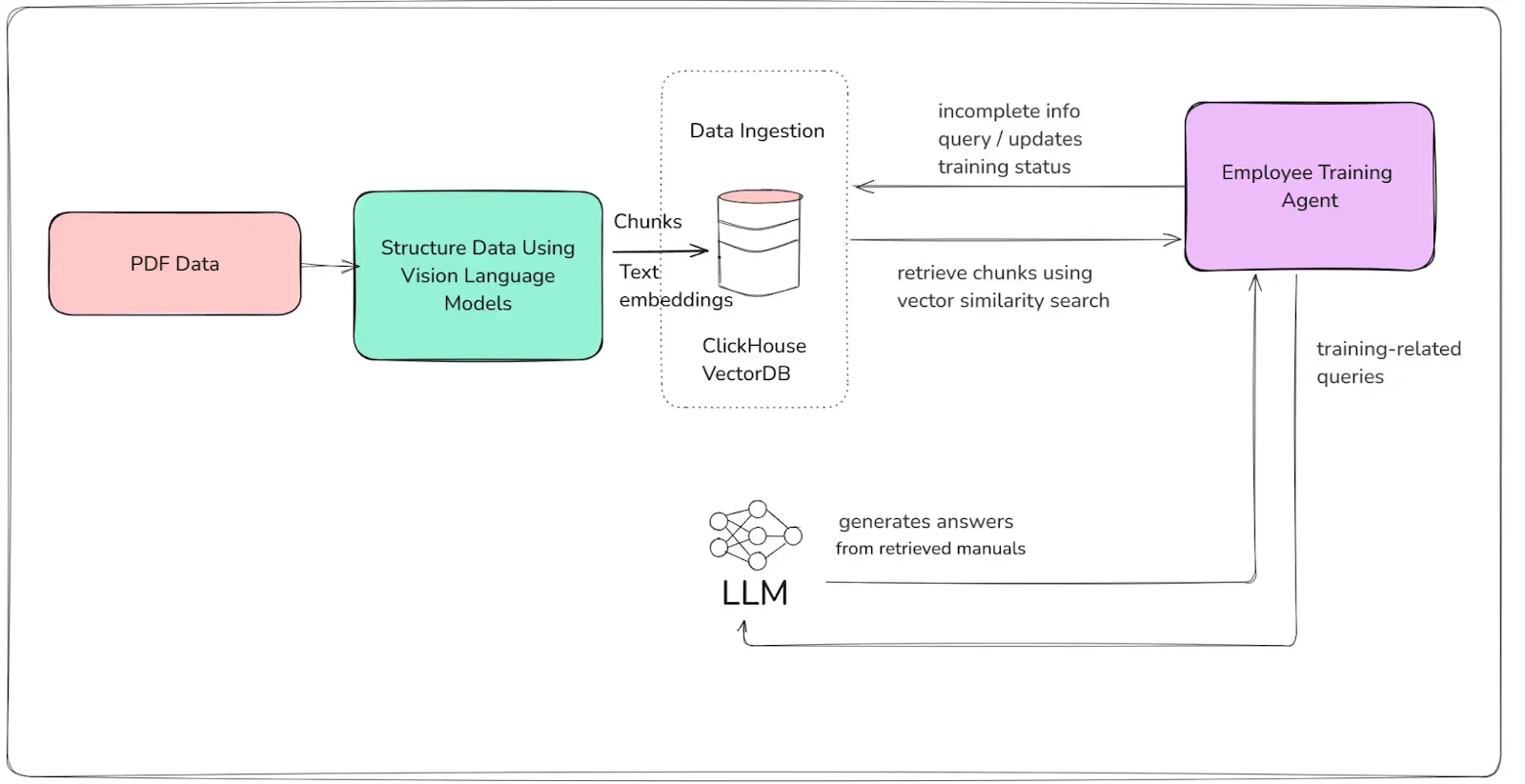
Here’s the workflow that we will use:
Agent Workflow
- **Gap Analysis:
**The agent queries the employee_training table to identify incomplete or upcoming training modules for a given employee. - **Semantic Retrieval:
**For content delivery or answering questions, the agent retrieves relevant training manual chunks from the training_manual_chunks table using vector similarity search. - **LLM-Powered Interaction:
**Uses Magistral Small to generate microlearning content or answer specific training-related questions, grounded in retrieved manual content. - **Progress Tracking:
**Updates the training completion status and collects employee feedback.
To start, let’s define Pydantic models for type safety:
from pydantic import BaseModel
from typing import List, Optional

class TrainingGapQuery(BaseModel):
    employee_id: str

class TrainingGapResponse(BaseModel):
    required_courses: List[str]
    next_due: Optional[str]

class TrainingQAQuery(BaseModel):
    employee_id: str
    question: str

class TrainingQAResponse(BaseModel):
    answer: str
    source_chunks: List[str]

class CompletionFeedback(BaseModel):
    employee_id: str
    course_id: str
    feedback: Optional[str]
    score: Optional[float]
Now - let’s create an agent function to find training gaps and answer training questions:
from pydantic_ai.agent import Agent, agent_function
from clickhouse_connect import get_client

client = get_client(host='localhost', database='default')

class EmployeeTrainingAgent(Agent):

    @agent_function
    def find_training_gaps(self, query: TrainingGapQuery) -> TrainingGapResponse:
        # Query ClickHouse for incomplete trainings
        sql = f"""
            SELECT course_id, course_due_date
            FROM employee_training
            WHERE employee_id = '{query.employee_id}' AND course_completed = 0
            ORDER BY course_due_date ASC
        """
        result = client.query(sql)
        required_courses = [row['course_id'] for row in result.result_rows]
        next_due = result.result_rows[0]['course_due_date'] if result.result_rows else None
        return TrainingGapResponse(required_courses=required_courses, next_due=next_due)

    @agent_function
    def answer_training_question(self, query: TrainingQAQuery) -> TrainingQAResponse:
        # Embed the question and find relevant manual chunks
        question_embedding = get_embedding(query.question)  # Use your embedding model/API here
        sql = f"""
            SELECT content
            FROM training_manual_chunks
            ORDER BY cosineDistance(embedding, {question_embedding})
            LIMIT 3
        """
        result = client.query(sql)
        source_chunks = [row['content'] for row in result.result_rows]
        # Compose the answer with Magistral Small (LLM)
        context = "\n".join(source_chunks)
        answer = magistral_small_llm.generate_answer(query.question, context)
        return TrainingQAResponse(answer=answer, source_chunks=source_chunks)

    @agent_function
    def record_completion_feedback(self, feedback: CompletionFeedback):
        # Update feedback and score for completed training
        sql = f"""
            ALTER TABLE employee_training
            UPDATE feedback_score = {feedback.score}, completion_date = now()
            WHERE employee_id = '{feedback.employee_id}' AND course_id = '{feedback.course_id}'
        """
        client.command(sql)
Key Points
- Grounded QA: Answers to employee queries are always traceable to specific training manual content.
- Flexible: You can extend this agent to schedule reminders, recommend next courses, or escalate gaps.
- Composability: The agent can be used directly, or called by a master orchestrator agent in a larger multiagent system.
2- Supply Chain Events Agents
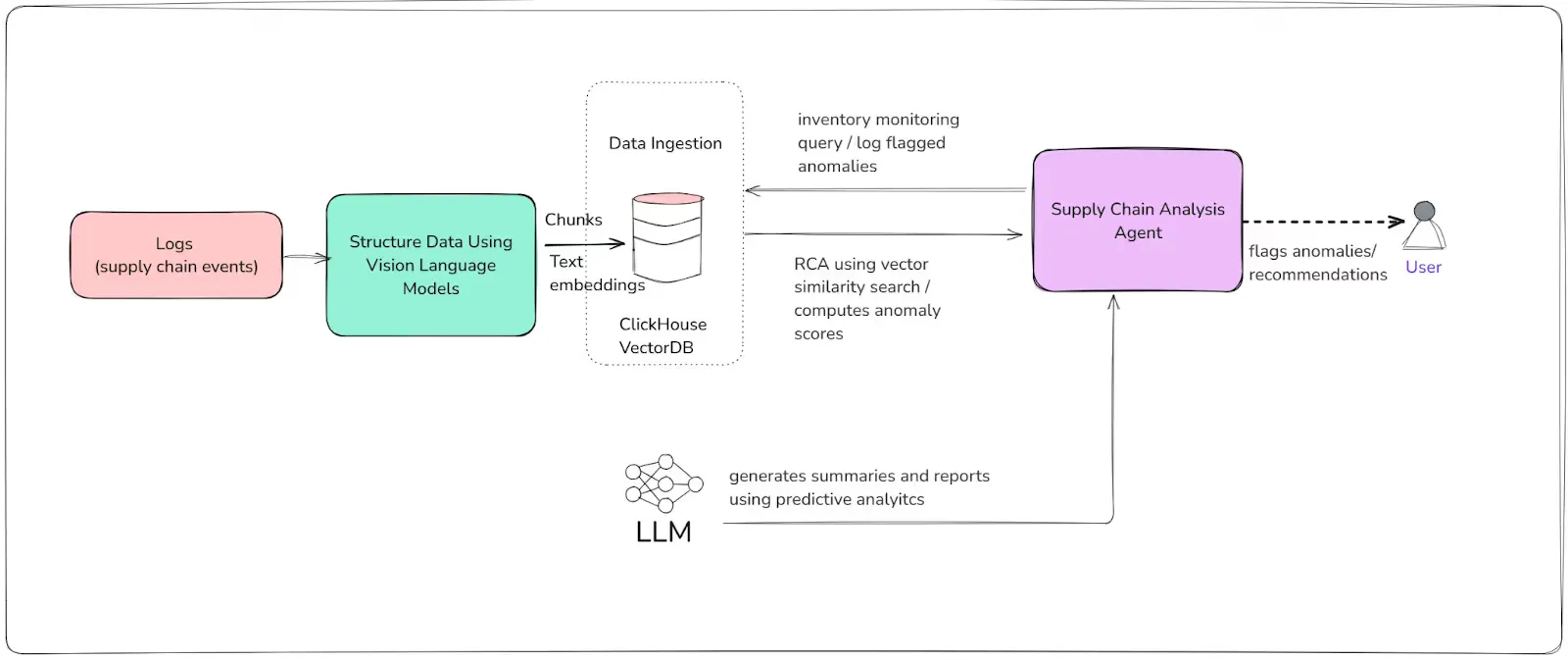
The Supply Chain Events Agent continuously monitors inventory, detects anomalies, forecasts bottlenecks, and recommends actions such as reordering or rerouting. It leverages ClickHouse for storing and analyzing high-frequency supply chain data, and uses vector embeddings for semantic pattern detection and retrieval. When needed, it can call on Magistral Small for complex reasoning or generating summary reports.
Agent Workflow
- **Real-Time Event Ingestion:
**The agent ingests and logs new supply chain events, including inventory levels and locations. - **Anomaly Detection:
**It computes anomaly scores and flags events where inventory drops below reorder thresholds or where statistical outliers are observed. - **Bottleneck Forecasting:
**By analyzing recent trends, the agent predicts potential shortages and recommends preventive actions. - **Semantic Event Search:
**Uses vector search to find historical events similar to current situations for root cause analysis. - **LLM-Driven Summarization (optional):
**Generates human-readable summaries or decision-support reports using the LLM.
Let’s define the Pydantic schemas:
from pydantic import BaseModel
from typing import List, Optional
class SupplyChainQuery(BaseModel):
    product_id: str
    lookback_days: int = 7
class SupplyChainAnomalyResponse(BaseModel):
    bottleneck_locations: List[str]
    risk_score: float
    flagged_events: List[str]
    recommendations: Optional[List[str]]
Now let’s implement the agent logic:
from pydantic_ai.agent import Agent, agent_function
from clickhouse_connect import get_client

client = get_client(host='localhost', database='default')

class SupplyChainAgent(Agent):

    @agent_function
    def analyze_supply_chain(self, query: SupplyChainQuery) -> SupplyChainAnomalyResponse:
        # 1. Fetch recent events for product
        sql = f"""
            SELECT timestamp, location, inventory_level, reorder_threshold, anomaly_score
            FROM supply_chain_events
            WHERE product_id = '{query.product_id}' AND timestamp >= today() - INTERVAL {query.lookback_days} DAY
            ORDER BY timestamp DESC
        """
        result = client.query(sql)
        events = result.result_rows

        # 2. Flag low inventory locations and calculate average risk
        bottleneck_locations = []
        risk_sum = 0.0
        flagged_events = []
        recommendations = []
        count = 0

        for row in events:
            count += 1
            risk_sum += row['anomaly_score'] or 0
            if row['inventory_level'] < row['reorder_threshold']:
                bottleneck_locations.append(row['location'])
                flagged_events.append(f"{row['timestamp']} at {row['location']}")
                recommendations.append(f"Reorder at {row['location']}")

        risk_score = (risk_sum / count) if count else 0.0

        return SupplyChainAnomalyResponse(
            bottleneck_locations=bottleneck_locations,
            risk_score=round(risk_score, 2),
            flagged_events=flagged_events,
            recommendations=recommendations if recommendations else None
        )
We can also create an agent function to analyze current events and compare them to historical events:
@agent_function
def find_similar_events(self, event_embedding: list, top_n: int = 3):
    sql = f"""
        SELECT timestamp, location, inventory_level
        FROM supply_chain_events
        ORDER BY cosineDistance(vector, {event_embedding})
        LIMIT {top_n}
    """
    result = client.query(sql)
    return result.result_rows
Key Points
- Real-time detection and recommendation: The agent flags at-risk inventory before it causes bottlenecks.
- Flexible querying: You can slice data by product, time, or even location.
- Extendibility: Integrate with LLMs to generate automated reports, escalation emails, or predictive analytics.
3- Invoice Enrichment Agent
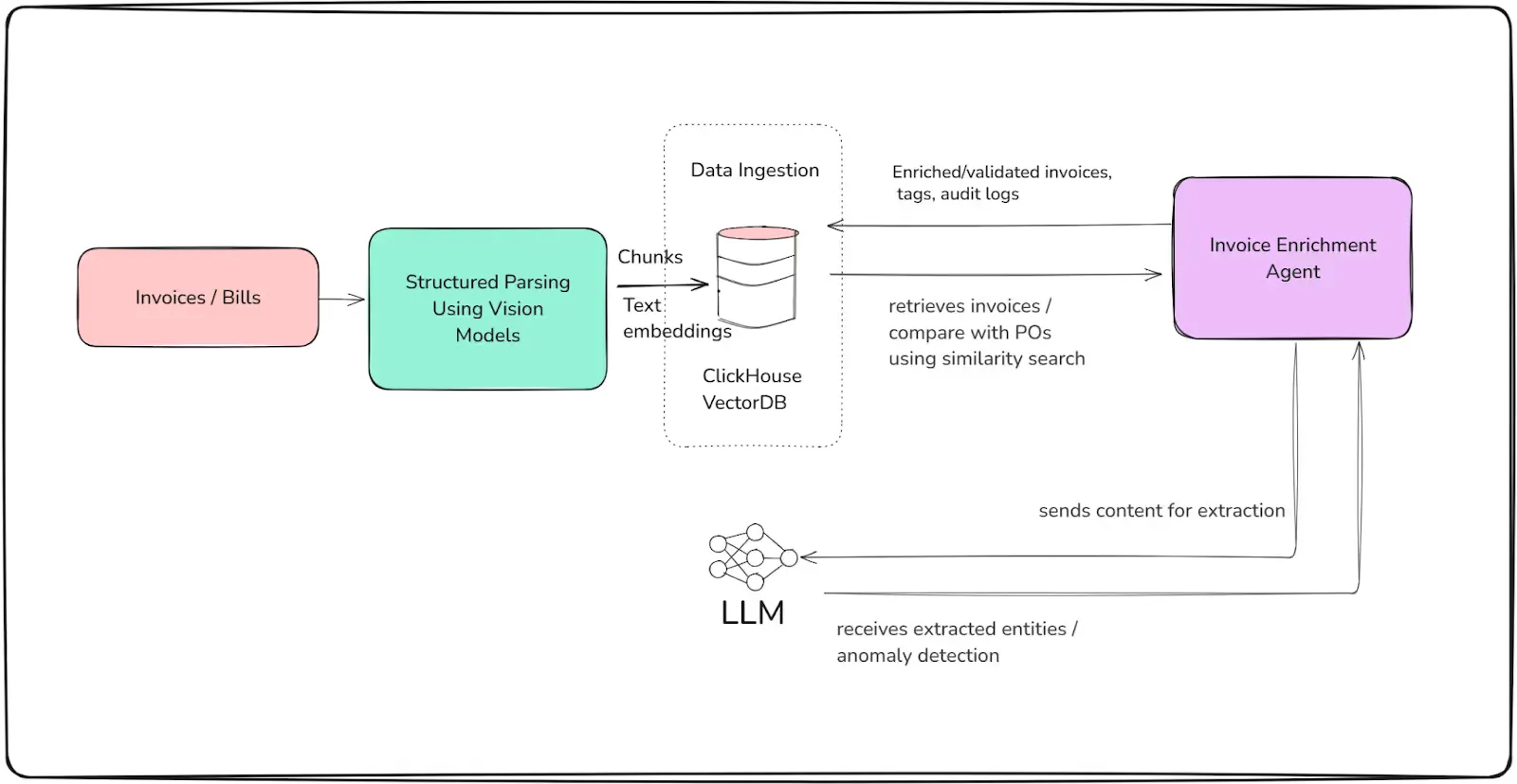
The Invoice Enrichment Agent automates the process of validating, tagging, and augmenting incoming invoices—minimizing manual effort, reducing errors, and accelerating accounts processing. It reads raw invoice data from ClickHouse, cross-references purchase orders (POs), parses and extracts key entities, flags anomalies, and writes enrichment results back for audit and downstream ERP integration.
Agent Workflow
- **Invoice Retrieval:
**The agent pulls unprocessed or newly received invoices from the invoice_data table. - **Entity Extraction:
**It parses line items and metadata, using an LLM (Magistral Small or similar) for semantic entity extraction (such as tax IDs, payment terms, or vendor info). - **Validation and Cross-Checks:
**The agent compares invoice fields and line items against expected values or linked POs. Discrepancies, duplicates, or outliers are flagged for review. - **Anomaly Detection and Tagging:
**It uses rules, embeddings, or LLM-based classification to highlight potential errors, fraud, or compliance risks. - **Enrichment and Audit Trail:
**The agent writes results—such as validation status, extracted entities, flagged fields, and notes—back to ClickHouse, ensuring a traceable enrichment workflow.
First, let’s create the schemas:
from pydantic import BaseModel
from typing import Optional, List
class InvoiceEnrichmentQuery(BaseModel):
    invoice_id: str
class InvoiceEnrichmentResult(BaseModel):
    invoice_id: str
    validated: Optional[bool]
    flagged_fields: Optional[List[str]]
    extracted_entities: Optional[dict]
    enrichment_notes: Optional[str]
Next, let’s implement the agent logic:
from pydantic_ai.agent import Agent, agent_function
from clickhouse_connect import get_client
import json

client = get_client(host='localhost', database='default')

class InvoiceEnrichmentAgent(Agent):

    @agent_function
    def enrich_invoice(self, query: InvoiceEnrichmentQuery) -> InvoiceEnrichmentResult:
        # 1. Fetch raw invoice
        sql = f"""
            SELECT * FROM invoice_data
            WHERE invoice_id = '{query.invoice_id}'
            LIMIT 1
        """
        result = client.query(sql)
        if not result.result_rows:
            return InvoiceEnrichmentResult(invoice_id=query.invoice_id)

        invoice = result.result_rows[0]

        # 2. Parse and extract entities
        line_items = json.loads(invoice['line_items_json'])
        entities = {
            "supplier_name": invoice['supplier_name'],
            "total_items": invoice['line_item_count'],
            "po_id": invoice['po_id'],
            # You could add LLM-based extraction for tax ID, terms, etc.
        }

        # 3. Validation example: check amounts match line items
        calculated_total = sum(item["qty"] * item["unit_price"] for item in line_items)
        flagged_fields = []
        if abs(calculated_total - invoice['total_amount']) > 0.01:
            flagged_fields.append("total_amount")

        # 4. Optional: LLM for semantic validation/anomaly detection
        # enrichment_notes = magistral_small_llm.classify_invoice(invoice, line_items)
        enrichment_notes = None  # Placeholder for LLM output

        # 5. Write enrichment back to ClickHouse
        update_sql = f"""
            ALTER TABLE invoice_data
            UPDATE validated = {1 if not flagged_fields else 0},
                   flagged_fields = '{",".join(flagged_fields)}',
                   extracted_entities = '{json.dumps(entities)}',
                   enrichment_notes = '{enrichment_notes if enrichment_notes else ""}',
                   last_checked = now()
            WHERE invoice_id = '{query.invoice_id}'
        """
        client.command(update_sql)

        return InvoiceEnrichmentResult(
            invoice_id=query.invoice_id,
            validated=(len(flagged_fields) == 0),
            flagged_fields=flagged_fields or None,
            extracted_entities=entities,
            enrichment_notes=enrichment_notes
        )
Key Points
- Automated validation: Flags discrepancies between stated and computed totals, and can be extended for PO-matching, duplicate detection, or tax compliance.
- Extensible enrichment: LLM integration enables semantic extraction, classification, and human-readable enrichment notes.
- Traceability: All enrichment actions are written back to ClickHouse, ensuring a clear audit trail for every invoice.
4- Orchestrating the Agents
To streamline user interaction, you’ll use a centralized orchestrator (a “hub” or “router”) that exposes all available agents under a common interface. The user can specify the task or agent type, provide the relevant query, and receive structured results, making it easy to scale and extend as new agents are added.
Step 1: Define the Orchestrator
Using pydantic-ai, you can implement an orchestrator class that registers all your agents and dispatches incoming requests:
from typing import Dict, Any
from pydantic_ai.hub import AgentHub

# Instantiate your agents (see previous sections)
employee_agent = EmployeeTrainingAgent()
supply_chain_agent = SupplyChainAgent()
invoice_agent = InvoiceEnrichmentAgent()

# Register agents in a hub
hub = AgentHub([
    employee_agent,
    supply_chain_agent,
    invoice_agent
])

# Mapping for user-friendly agent names (optional)
AGENT_NAME_MAP = {
    "employee_training": employee_agent,
    "supply_chain": supply_chain_agent,
    "invoice_enrichment": invoice_agent
}
Next, let’s create an API for the orchestration:
from fastapi import FastAPI
from pydantic import BaseModel

app = FastAPI()

class AgentInvocation(BaseModel):
    agent: str
    payload: Dict[str, Any]

@app.post("/invoke")
def invoke_agent(invocation: AgentInvocation):
    agent = AGENT_NAME_MAP.get(invocation.agent)
    if not agent:
        return {"error": "Unknown agent"}
    if invocation.agent == "employee_training":
        query = TrainingGapQuery(**invocation.payload)
        result = agent.find_training_gaps(query)
    elif invocation.agent == "supply_chain":
        query = SupplyChainQuery(**invocation.payload)
        result = agent.analyze_supply_chain(query)
    elif invocation.agent == "invoice_enrichment":
        query = InvoiceEnrichmentQuery(**invocation.payload)
        result = agent.enrich_invoice(query)
    else:
        return {"error": "Unsupported action"}
    return result

# Now POST {"agent": "invoice_enrichment", "payload": {"invoice_id": "INV-2025-010"}} etc.
Key Advantages of This Pattern
- User-Friendly: Users or calling systems select the agent and pass structured queries—no direct knowledge of agent internals needed.
- Extensible: Add new agents and update the orchestrator with minimal code changes.
- Unified Interface: Centralizes logging, error handling, and access controls for all agents.
Integration-Ready: Ready for use in backend APIs, UIs, chatbots, or batch pipelines.
Results: What You Achieve with Multiagent Orchestration
With your agents orchestrated and data flowing through ClickHouse, you now have a modular AI-driven system capable of transforming manufacturing operations. Here’s a snapshot of real outputs generated by each agent in your stack:
1. Employee Training Agent
Query:
Find training gaps for employee ID EMP-1234
{
  "required_courses": ["Safety_101", "Machine_Handling_Basics"],
  "next_due": "2025-07-20"
}
2. Supply Chain Events Agent
Query:
Analyze supply chain for product ID prod_001 (Hydraulic Pump)
{
  "bottleneck_locations": ["plant_1_warehouse"],
  "risk_score": 0.22,
  "flagged_events": ["2025-07-10 08:00:00 at plant_1_warehouse"],
  "recommendations": ["Reorder at plant_1_warehouse"]
}
3. Invoice Enrichment Agent
Query:
Enrich invoice with ID INV-2025-010
{
  "invoice_id": "INV-2025-010",
  "validated": true,
  "flagged_fields": null,
  "extracted_entities": {
    "supplier_name": "Precision Bearings Co.",
    "total_items": 2,
    "po_id": "PO-8501"
  },
  "enrichment_notes": null
}
System-Level Impact
- Speed: Tasks that once took hours (or days) can be completed in seconds.
- Accuracy: AI-powered agents ground their responses in real data and documentation, drastically reducing manual error.
- Scalability: The orchestrator framework allows you to add new agents or data sources with minimal effort—future-proofing your system.
- Traceability: Every action and enrichment step is logged, making audits straightforward and transparent.
Future Notes and Conclusions
The architecture and workflow you’ve implemented form a foundation that is both modular and highly extensible, designed not just for today’s manufacturing automation, but to support tomorrow’s digital transformation as well. As you look to the future, here are key areas to consider for further evolution:
- **Agent Chaining and Complex Workflows:
**You can enable more sophisticated automation by allowing agents to trigger or delegate tasks to one another, forming multi-step workflows. For example, an anomaly detected by the Supply Chain Events Agent could automatically invoke the Employee Training Agent to schedule a refresher for relevant personnel. - **Feedback Loops and Continuous Learning:
**With all actions and enrichment steps logged in ClickHouse, you can introduce reinforcement learning or human-in-the-loop workflows. Feedback from users—such as manual overrides or corrections—can be fed back into the system, improving LLM prompts, anomaly thresholds, or entity extraction logic. - **Richer Multimodal and Multilingual Support:
**Incorporating images, sensor streams, or videos (e.g., equipment maintenance walkthroughs) will enable agents to reason over more than just text. With models like Magistral Small supporting multiple languages, you can also broaden your agent system’s applicability across global operations. - **Security, Privacy, and Audit:
**As AI agents begin to impact critical business processes, robust authentication, role-based access control, and end-to-end audit logging become essential. You should plan for integration with your organization’s IAM and compliance stack. - **Integration with External Systems:
**The agents described here can be extended to communicate directly with ERP, MES, or supplier management systems—making your automation both horizontally and vertically integrated across the manufacturing tech stack. - **Edge and Real-Time Deployments:
**With lightweight, containerized agents and efficient embedding models, you can push certain agents closer to the factory floor, enabling real-time decisioning even in low-connectivity environments.
Conclusions
By building a multiagent system using open, composable tools like PydanticAI, ClickHouse, and Magistral Small, you have transformed your manufacturing processes from static, manual, and error-prone to dynamic, data-driven, and scalable. This system is:
- Adaptable: Each agent can evolve independently, keeping pace with new regulations, products, or process changes.
- Auditable: Every enrichment or decision step is fully traceable, meeting the demands of both regulators and auditors.
- Proactive: Your organization can move from reactive firefighting to proactive, predictive operations.
- Future-Proof: The modular approach makes it easy to swap out models, add new agents, or integrate the latest AI innovations without rearchitecting your core systems.
The multiagent pattern isn’t just a technical trend—it’s a strategic lever for competitiveness in the era of Industry 4.0. As you continue to experiment, refine, and extend your system, you’ll not only automate but also elevate human expertise and business performance throughout your manufacturing enterprise.
Ready to take the next step?
Consider piloting advanced agent workflows, integrating real-time data streams, and driving feedback-based model improvement to unlock even more value from your AI-powered manufacturing backbone. Get in touch with our team to learn how we can help!
-Feature-Image.CjBFdO7y_Z1bTNvg.webp)